Binning
Binning is a technique that combines the charge of two (or more) adjacent pixels into a single pixel. This results in increased light sensitivity since there is a larger sensor area to capture photons. The sensor spatial resolution is reduced, but the improved low-light sensitivity and signal-noise ratio may solve a difficult imaging situation.
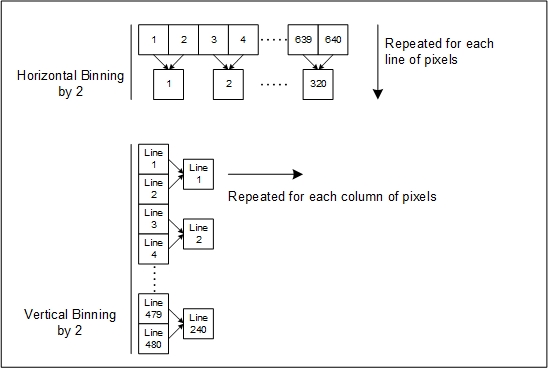
Horizontal and vertical binning functions are independent, by factors of 2 or 4 in each axis (may vary with devices). For instance, with a 640 x 480 image size, if horizontal binning only is activated by a factor of 2, the resulting image is reduced to 320 x 480. If vertical binning only is activated, the image is reduced to 640 x 240. With both binning modes activated, the resulting image is 320 x 240.
Binning support is device-dependent. It is part of the Image Format Controls category of features.
When to Use Binning
Use binning to improve performance in low-light conditions, to improve the signal to noise ratio, or to increase the data rate.
Binning Features
The following features are associated with binning. Depending on model, binning features might not be available.
-
Binning Selector
-
Binning Mode
-
Binning Horizontal
-
Binning Vertical
Binning Selector
Binning can be done:
-
on the sensor itself, allowing for an increased data rate.
-
digitally, using a processing function within the device.
Binning Mode
There are two ways to combine the charge of adjacent pixels:
-
Summing: The charges are added together, resulting in increased sensitivity.
-
Averaging: The charges are average, resulting in an increased signal to noise ratio. Support is device-dependent.
Binning Constraints
Binning limits the image width and height.
-
Applying a binning factor of 2 horizontally reduces the width of the image by the same factor (output half as wide).
-
Applying a binning factor of 2 vertically reduces the height of the image by the same factor (output half as tall).
 ©
©