GigE Network Adapter Installation
Genie Nano 10G connects to a computer’s Gigabit Network Adapter (NIC). If the computer is already connected to a network, the computer will require a second network adapter not connected to the network. Follow instructions from the NIC supplier to install and configure your adapter.
Once you have installed Sapera LT, only the following two options should be enabled in the Networking properties of your NIC:
-
Teledyne DALSA Sapera GigE Vision Filter Driver
-
Internet Protocol Version 4 (TCP/IPv4)
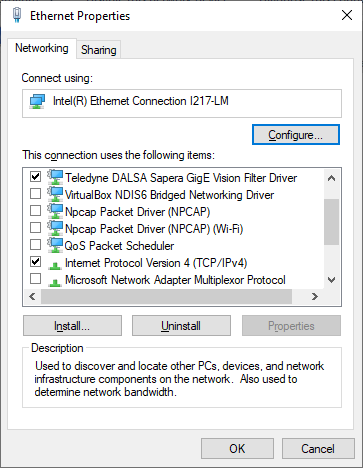
See PAUSE Frame Support on enabling Gigabit Ethernet PAUSE Frame feature.
For additional information on optimizing network adaptors for GigE Vision cameras, refer to the Teledyne GigE Vision Interface user manual and optimization guide, which is included with the installation of Sapera LT.
 ©
©