Other Problems or Issues
This section describes problems that do not fit any of the categories above. Typically, these are issues found in the field under specific or unusual conditions.
Preventing Dropped Packets by Adjusting Power Options
New computers using new generation CPU chips such as Intel Skylake require adjustments to the default Power Options to avoid possible dropped packets or frames.
-
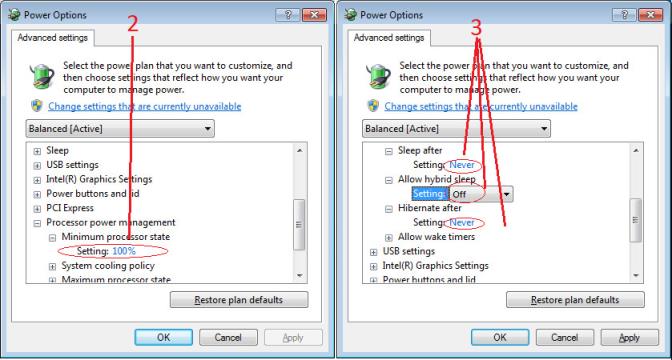
Open Control Panel – Power Options and select advanced settings, as shown below.
-
Scroll down to the Processor Power Management control and change the Minimum Processor State to 100%.
-
Disable the Sleep and Hibernate options to ensure continuous system operation.
Random Invalid Trigger Events
Do not change the exposure time while grabbing, else an Invalid Trigger Event may be generated. This applies to any exposure mode or trigger source. The Invalid Trigger Event is not catastrophic and only indicates the loss of a video frame. Stopping acquisitions first will avoid this error.
Minimum Sapera Version Required
Save User Configuration Failed: An unusual error that occurred with no other Nano-10G control problem. The solution is to verify the minimum Sapera version used with the Nano-10G. The Genie Nano-10G requires Sapera LT version 8.70 or later.
Issues with Uninstalling Cognex VisionPro with Sapera LT CamExpert
When the Cognex VisionPro package is uninstalled, the Genie Nano-10G becomes unavailable within CamExpert due to the Cognex uninstaller removing GigE Vision components. This forces a Genie Nano-10G user to reinstall or execute a repair within Sapera LT.
Cognex VisionPro remains a useable third-party product except for their uninstaller fault. Genie Nano-10G users just need to account for this issue until resolved by Cognex.
 ©
©